
Office 365: Search for and Delete Email Messages
How to search for and delete email messages across Microsoft 365 mailboxes with PowerShell, updated for modern authentication and the 2025 purge changes.
Why Microsoft 365 won't let you hide a synced group from address lists, and how to fix it on-premises with msExchHideFromAddressLists and a sync.


I hit the HiddenFromAddressListsEnabled error in 2018 while trying to tick Hide this group from address lists on a distribution group in the Office 365 Exchange admin centre. Instead of saving, it returned:
The action 'Set-DistributionGroup', 'HiddenFromAddressListsEnabled', can't be performed on the object 'Example Group' because the object is being synchronized from your on-premises organization. This action should be performed on the object in your on-premises organization.
The setting can still be changed, just not where you are trying to change it. Here is why it happens, and the fix that worked for me, updated for 2026.
In a hybrid setup, the group is created and owned in your on-premises Active Directory. A sync tool copies it to Microsoft 365.
On-premises is the source of authority, so Exchange Online refuses to edit the object. If it allowed the edit, your change would be overwritten at the next sync.
The cause has not changed. The same message still appears for mailboxes too, with Set-Mailbox in place of Set-DistributionGroup.
Update 2026: "Office 365" is now Microsoft 365, and Azure AD Connect is now Microsoft Entra Connect Sync.
There are two ways. Both change the same setting on the on-premises object, which then syncs to the cloud.
In my original note I used this command, and it is still correct. $true means the recipient is hidden from address lists:
Set-DistributionGroup -Identity "GroupName" -HiddenFromAddressListsEnabled $true
Update 2026: this cmdlet exists in both on-premises Exchange and Exchange Online, as the Set-DistributionGroup documentation shows.
If you run it in Exchange Online against a synced group, you get the very error above. Run it in the on-premises Exchange Management Shell instead, then sync.
This is the method Microsoft documents for hybrid deployments. The correct attribute name is msExchHideFromAddressLists (my original note misspelled it).
msExchHideFromAddressLists, click Edit, and change the value from <Not set> to True.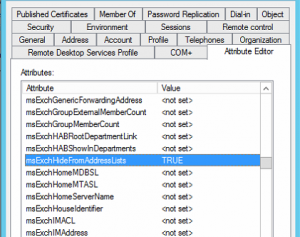
Wait for the next scheduled sync, or force a delta sync on the Microsoft Entra Connect server:
Start-ADSyncSyncCycle -PolicyType Delta
msExchHideFromAddressLists is on Microsoft's list of attributes synchronised to Exchange Online for users, contacts and groups, so the change will flow up.
Connect to Exchange Online with the current module, then read the value back:
Connect-ExchangeOnline
Get-DistributionGroup -Identity "GroupName" | Select-Object Name, HiddenFromAddressListsEnabled
You want True.
In Outlook, the global address list can take a while to update, especially with cached mode and the offline address book. Give it time before deciding it failed.
mailNickname (alias) attribute is populated. A Microsoft Q&A community answer explains that if it is empty, changes to Exchange-related attributes are not synced. This is community advice rather than formal documentation, but it is worth checking.Get-ADGroup "GroupName" -Properties * | Export-Clixml .\GroupName-backup.xml.| Step | Where | Done |
|---|---|---|
| Back up current group attributes | On-premises AD | ☐ |
Set msExchHideFromAddressLists = True (or run cmdlet on-prem) |
ADUC / Exchange SE shell | ☐ |
Confirm mailNickname is populated |
ADUC | ☐ |
| Run delta sync | Entra Connect server | ☐ |
Verify with Get-DistributionGroup |
Exchange Online PowerShell | ☐ |
The takeaway: when Microsoft 365 says an object is synchronised from on-premises, stop editing in the cloud. Change it where it lives, in Active Directory or on-premises Exchange, then let the sync carry it across.
📝 First written from my own work in 2018; updated and expanded in November 2026 with AI assistance, keeping my original fix. Spotted something wrong? Tell me.
IT leader, engineer and security specialist from Erbil with 20+ years across higher education, telecoms, healthcare and government. Founder of BulkSMSIraq, VerifyWay and Kurd.ai.
How to search for and delete email messages across Microsoft 365 mailboxes with PowerShell, updated for modern authentication and the 2025 purge changes.
A PowerShell script to remove users from an AD group using a CSV of email addresses, updated for 2026 with dry runs, error handling and an audit log.
How to let Exchange Online users send email from an alias or proxy address, using the admin centre or PowerShell with the current EXO V3 module.